
HLM Group of Institutions
HLM College
SECURE ENROLLMENT FORM

Step 1 of 1 · Student details

Student ID Card Enrollment

Fill in your information below for your official HLM College student identity card. Your photo is checked automatically — it must be a clear, front-facing, professional passport-style photo on a plain background.
Enter your details

Student ID card application form

All fields marked with an asterisk are required. Your details will appear on your ID card exactly as entered.

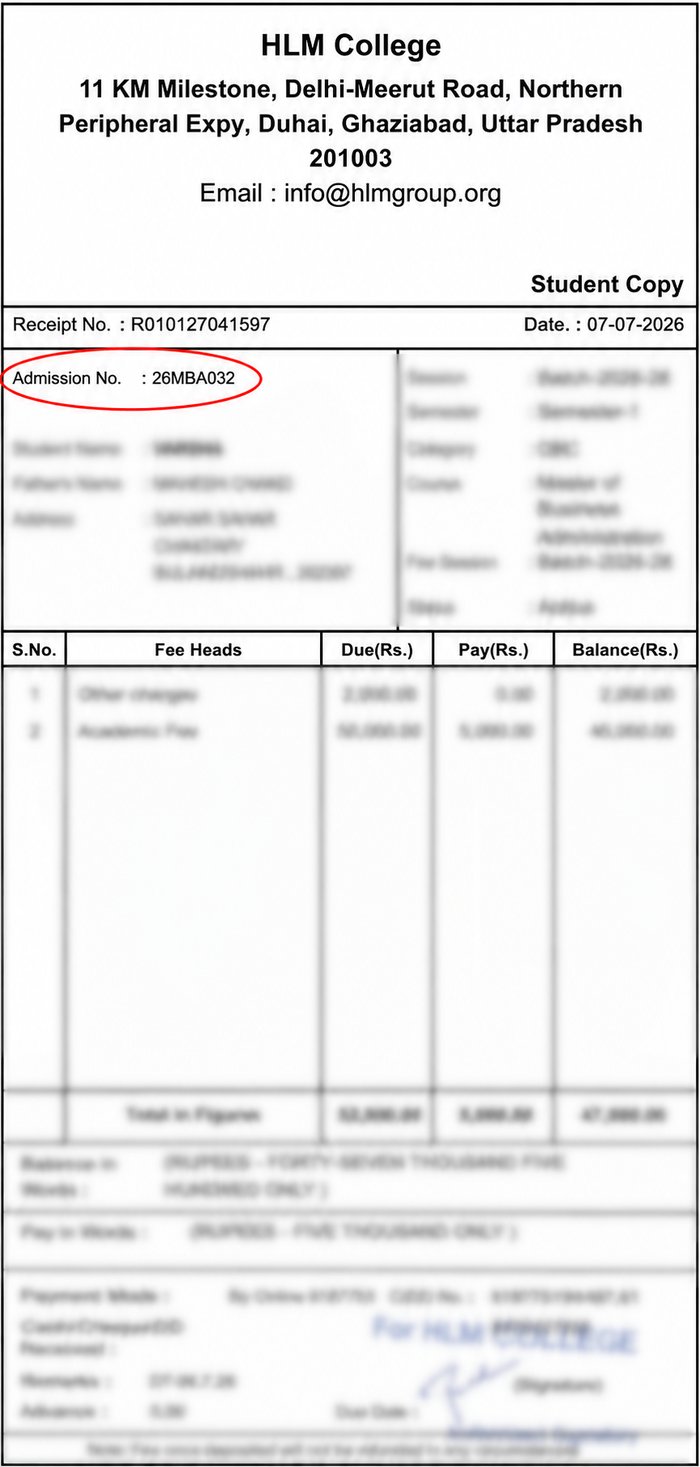
How to get Admission No.?
  • Photo must be professional (like a passport photo) — plain background, looking straight at the camera, well-lit.
  • Selfies, group/party photos, mirror photos, or cartoon/avatar/AI-filtered images will NOT be accepted.
  • Make sure all information you enter is correct — it will be printed on your ID card exactly as filled.
  • Your Admission No. must match the one on your fee receipt.

Facing any problem filling this form?

Coordinator Name——————

Phone——————

Department——————

Please contact the above coordinator for help.

Live badge preview

HLM Group of InstitutionsOFFICIAL ID CARD

Your Name

Course


Batch
Adm No
Mobile
ID · ENROLLMENT PREVIEW

How to find your Admission No.

  1. Open the Fee Slip / Fee Receipt you received from the college (check your email or the student portal).
  2. Look near the top of the slip, just below the Receipt No. and Date row.
  3. Find the field labelled "Admission No." — it looks like 26MBA032 (year + course code + number).
  4. Check that this exact number matches what you enter in the form below.
Sample fee slip showing where the Admission No. is printed

Sample fee slip shown above — your Admission No. will be in the same position, circled here for reference.